Package ilcd
Class Attribute
Public Method setFillingGradient
static void setFillingGradient(int mode, int ramp, int fromColor, int toColor)
Throws:
_INSERT_METHOD_SIGNATURE_HERE_
Description:
| Parameter |
Range |
Description |
| mode |
0 ... 4 |
gradient mode (see below) |
| ramp |
0 ... max[width, height] |
pixels until toColor is reached (0 = maximum) |
| fromColor |
0x000000 ... 0xFFFFFF |
color value at beginning of gradient |
| toColor |
0x000000 ... 0xFFFFFF |
color value at end of gradient |
Sets the active fill pattern to a gradient going from fromColor to toColor. All subsequent filling will be done with a gradient dependent on mode, which can be:
| Mode |
from red to blue |
Description |
| GRADIENT_HORIZONTAL |
 |
ramp from left |
| GRADIENT_VERTICAL |
 |
ramp from top |
| GRADIENT_HORIZONTAL_SYMMETRICAL |
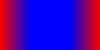 |
ramp from left and right |
| GRADIENT_VERTICAL_SYMMETRICAL |
 |
ramp from top and bottom |
| GRADIENT_BUTTONIZED |
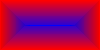 |
ramp from all directions |
Note
- If ramp is set to 0 or the area to fill is smaller than ramp in the according direction, the gradient fades over the complete area disregarding the set ramp value.
- In any other case, the gradient starts from fromColor and gradually changes to toColor for ramp pixels. The rest of the according area is filled with the solid toColor.
- The ramp is scaled by the corresponding coordinate scale factor (refer to Control.setRowCoordinatesScaling(int, int) for horizontal and Control.setColumnCoordinatesScaling(int, int) for vertical gradients). For buttonized gradients, the smaller of those two scale factor is taken into account.
- The default fill pattern is a solid color (see Attribute.setFillingColor(int)) with a color_value of 0x000000 (black). It will be automatically set to default on startup and by the methods General.resetAll() or General.rebootPanelController().
Attribute.setFillingGradient(Attribute.GRADIENT_BUTTONIZED, 20, 0xFFFFFF, 0x00FF00);
All future filling will be done with a gradient that fades from white to blue for 20 pixels in all directions. Filling an area with this pattern will give it a three-dimensional "buttonized" look.
See also:
Copyright © demmel products gmbh. All rights reserved.